Learning how to hack the beta blogger template will help you making your blog customized and unique across blogosphere.
Beta Blogger Templates are made of XML/XHTML. There are five main parts to the template as described in Parts of the Template.
The CSS in the beta Blogger are :
body
outer-wrapper
wrap2
header-wrapper
header section
content-wrapper
main-wrapper
main section
sidebar-wrapper
sidebar section
footer-wrapper
footer section
A simple approach to hack the template is to delete the XML declarations and add <style> tags and then load them into any web editor. This also has its drawbacks as beta blogger may not recognize and accept them in certain cases.
But the best approach is to use the facilities provided by Beta Blogger itself. To use this approach follow these steps :
* Login to Dashboard and select Create a Blog.
* Create a blog with any name and post/publish it.
* Go to Pick New Template subtab under Template tab.
* Pick the Template which most closely resembles the design you have in mind.
* Save Template.
* Go to Edit HTML subtab under Template tab.
* Save the default template in your machine by clicking Download Full Template link.
* Scroll down in Edit Template text box.
* Look for the code you want to change.
* Click on PREVIEW at bottom to see the effect of the change.
* If you like the change click on SAVE TEMPLATE, else click UNDO to discard the changes.
17 February 2008
Removing the blog title
Though this tweak is not recommended, for it hampers the blogger engine's capability to sort and search the blogs, but still you can employ this hack and remove the title.
Login to dashboard and click on Layouts for the blog you wish to remove the title. Click on Edit HTML subtab of Template tab at the top. First backup your template to PC by clicking on Download Full Template link. Then scroll down till you come to the following code :
<div id='header-wrapper'>
<b:section class='header' id='header' maxwidgets='1' showaddelement='no'>
<b:widget id='Header1' locked='true' title='' type='Header'/>
</b:section>
</div>
Change locked='true' to locked='false' in the above code and SAVE TEMPLATE. Click on Page Elements subtab at the top to switch to Layouts view. Click on Edit link in the header Title section. In the new popup window click on Remove Link and confirm it.
NOTE:
The Remove link is not available before you "unlock" the title widget by changing true to false in the code.
Login to dashboard and click on Layouts for the blog you wish to remove the title. Click on Edit HTML subtab of Template tab at the top. First backup your template to PC by clicking on Download Full Template link. Then scroll down till you come to the following code :
<div id='header-wrapper'>
<b:section class='header' id='header' maxwidgets='1' showaddelement='no'>
<b:widget id='Header1' locked='true' title='' type='Header'/>
</b:section>
</div>
Change locked='true' to locked='false' in the above code and SAVE TEMPLATE. Click on Page Elements subtab at the top to switch to Layouts view. Click on Edit link in the header Title section. In the new popup window click on Remove Link and confirm it.
NOTE:
The Remove link is not available before you "unlock" the title widget by changing true to false in the code.
Ground Zero
Now that I've been using blogger for quite sometime, I think I should blog about the blogger hacks that I've come across while customizing my posts.
Here I plan to bring all the tweaks and hacks under one roof.
For, knowledge is good only if it is shared.
Hope you all will find it valuable.
Cheers
Here I plan to bring all the tweaks and hacks under one roof.
For, knowledge is good only if it is shared.
Hope you all will find it valuable.
Cheers
14 February 2008
Friday, the fifteenth of February '08
The brigade road tamasha
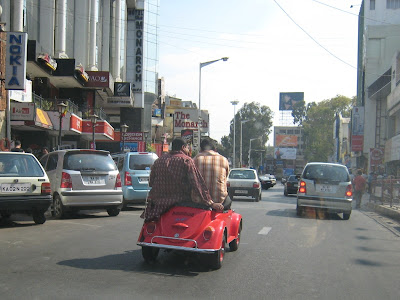
About the picture: While coming back from The Rice Bowl, where we had team-lunch, this was taken in Brigade road. Dunno whether that car was for real, looking at the size it shouldn't, but they were driving it in the live traffic, that too in notorious Brigade Road traffic. Looking at the logo, it was a VolksWagen...
About the picture: While coming back from The Rice Bowl, where we had team-lunch, this was taken in Brigade road. Dunno whether that car was for real, looking at the size it shouldn't, but they were driving it in the live traffic, that too in notorious Brigade Road traffic. Looking at the logo, it was a VolksWagen...
Subscribe to:
Posts (Atom)